Nutanix API proxy


The last week of November when I attended the .NEXT on tour in Copenhagen, Denmark, I had the pleasure of meeting up with Eric DeWitte in an EBX session for MSPs.
One big problem for us using different Nutanix services in a multitenant way has been the need to open ports towards our Prism Central to consume different API services for our tenants.
Eric showed me this ntnx-api-proxy appliance that you can deploy in the customer's subnet/vlan, and only from that machine open ports towards our Prism Central API. Much more secure and a nice way to segment things. We can also add a ton of sensors and conditional access rules to that machine.
You can find the API proxy Git repository here:
 nutanix-cloud-native
So let's try to install it.
First of all, I installed a Rocky Linux VM in our Test Nutanix environment. I will not cover the installation of the Linux VM in this post, but please refer to my other post where I cover that in detail:
 Jonas Högman
When we have our fresh Rocky Linux machine running and patched with the latest updates (sudo dnf update -y), let's place the box in the "end customer's subnet" and go ahead and install Docker:
sudo dnf config-manager --add-repo https://download.docker.com/linux/centos/docker-ce.repo

sudo dnf install -y docker-ce docker-ce-cli containerd.io docker-buildx-plugin docker-compose-plugin

sudo systemctl start docker
sudo systemctl enable docker
sudo usermod -aG docker $USER

### Verify with
docker --version
Once you have Docker installed, go ahead and clone the repository and create the cert folder:
git clone https://github.com/nutanix-cloud-native/ntnx-api-proxy.git
mkdir -p ~/ntnx-api-proxy/cert
cd ~/ntnx-api-proxy/cert
Now I created two certs from our internal CA and put the tls.key and tls.crt in the folder. I downloaded the CA cert and put it in the folder as ca.cer, looks like this now:
~/ntnx-api-proxy$ ls cert/
ca.cer  tls.crt  tls.key
Now let's take a look at the docker-compose.yaml file.
I changed the file to look like this:
services:
  ntnx-api-proxy:
    image: ghcr.io/nutanix-cloud-native/ntnx-api-proxy:latest
    restart: always
    ports:
      - 9440:9440
    environment:
      FQDN: fqdn-of-proxy.domain.local
      NUTANIX_ENDPOINT: fqdn-of-prism-central.domain.local
      #TRAEFIK_LOG_LEVEL: "info"
      #TRAEFIK_LOG_FORMAT: "json"
      #TRAEFIK_ACCESSLOG_FORMAT: "json"
      TRAEFIK_SERVERSTRANSPORT_ROOTCAS: /etc/traefik/cert/ca.cer
      DASHBOARD: enable
      # TRAEFIK_METRICS_PROMETHEUS: true
      # NOFILTER: true
    volumes:
      - ./cert:/etc/traefik/cert
      # - ./auth:/etc/traefik/auth
    logging:
      driver: "json-file"
      options:
        max-size: "10m"
        max-file: "3"
FQDN = the name / DNS name of the proxy
NUTANIX_ENDPOINT = the name / DNS name of your Prism Central
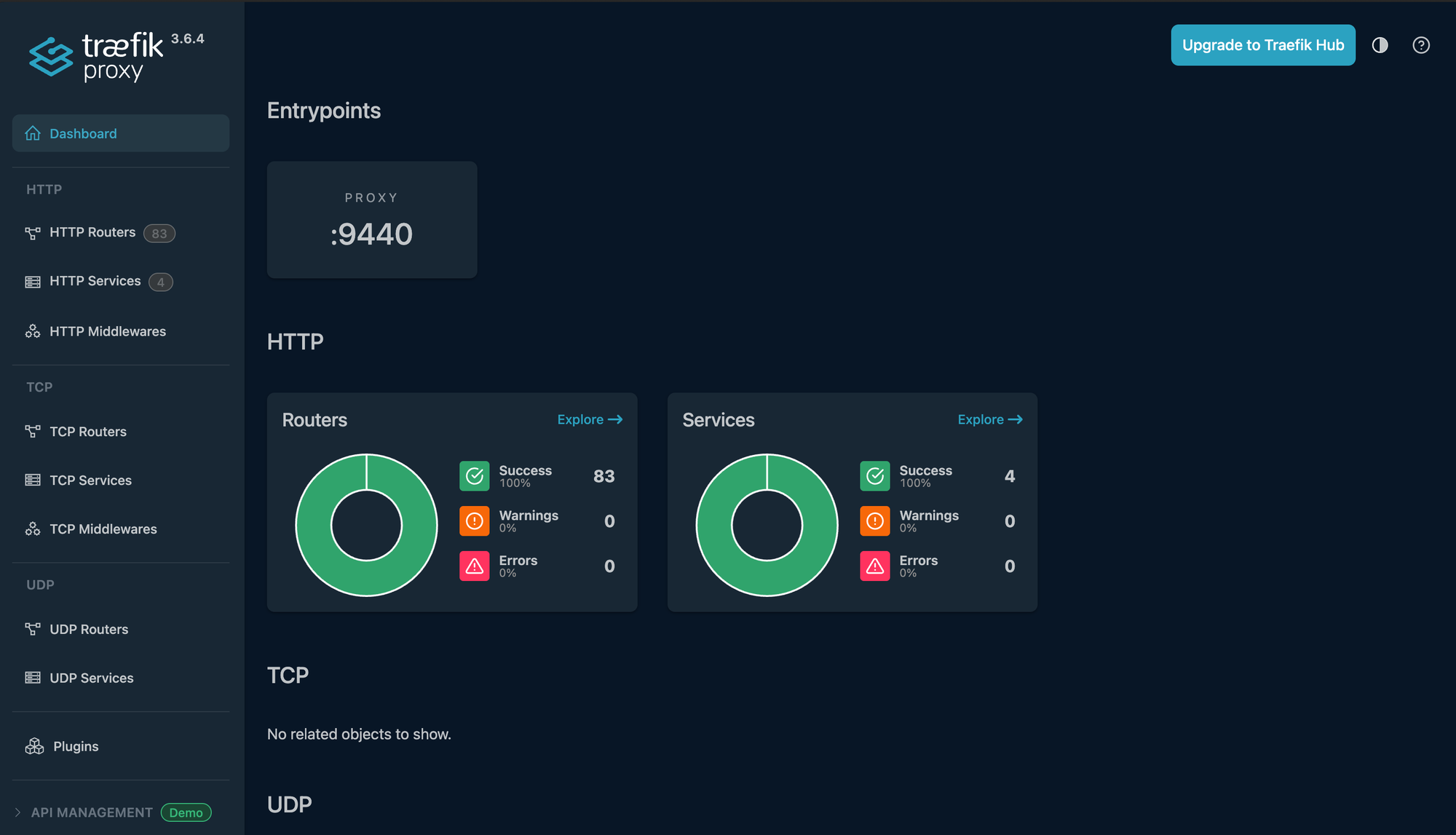
Also, I enabled the DASHBOARD.
Now let's go ahead and start the Docker container:
### Start:
sudo docker compose up -d
### Verify with:
sudo docker compose ps
Once we verify that the pods are running, let's see if we can reach the dashboard by going to https://<FQDN>:9440/dashboard
Now we need to test this out, and in my case I'll test this with the CSI driver version 3.3.4 from an RKE2 downstream cluster to verify that it works.
First, I update my pc-credentials secret:
echo -n "fqdn-of-proxy.domain.local:9440:MyUser:MyPassword" | base64
### Result:
ZnFkbi1vZi1wcm94eS5kb21haW4ubG9jYWw6OTQ0MDpNeVVzZXI6TXlQYXNzd29yZA==
Take that key and patch your ntnx-pc-secret in the ntnx-system namespace:
apiVersion: v1
kind: Secret
metadata:
 name: ntnx-pc-secret
 namespace: ntnx-system
data:
 # base64 encoded prism-ip:prism-port:admin:password.
 # E.g.: echo -n "10.0.00.000:9440:admin:mypassword" | base64
 key: ZnFkbi1vZi1wcm94eS5kb21haW4ubG9jYWw6OTQ0MDpNeVVzZXI6TXlQYXNzd29yZA==
Now let's deploy a test pod that uses a PVC with the Nutanix CSI driver:
pvc.yaml

apiVersion: v1
kind: PersistentVolumeClaim
metadata:
  name: test-pvc-proxy
  namespace: default
spec:
  accessModes:
    - ReadWriteOnce
  resources:
    requests:
      storage: 1Gi
  storageClassName: default-nutanix-storageclass
pod.yaml
apiVersion: v1
kind: Pod
metadata:
name: test-pod-proxy
namespace: default
spec:
containers:
- name: nginx
image: nginx:alpine
volumeMounts:
- name: test-volume
mountPath: /data
command: ["sh", "-c", "echo 'Testing ntnx-api-proxy' > /data/test.txt && tail -f /dev/null"]
volumes:
- name: test-volume
persistentVolumeClaim:
claimName: test-pvc-proxyApply them with:
kubectl apply -f pvc.yaml
kubectl apply -f pod.yaml
Let's verify that it works:
kubectl describe pvc test-pvc-proxy
Name:          test-pvc-proxy
Namespace:     default
StorageClass:  default-nutanix-storageclass
Status:        Bound
Volume:        pvc-8e64585b-9dd1-4835-a551-7ec82b1a72cb
Labels:        <none>
Annotations:   pv.kubernetes.io/bind-completed: yes
               pv.kubernetes.io/bound-by-controller: yes
               volume.beta.kubernetes.io/storage-provisioner: csi.nutanix.com
               volume.kubernetes.io/selected-node: gdm-rke2-test-workers-4qm8n-g5frk
               volume.kubernetes.io/storage-provisioner: csi.nutanix.com
Finalizers:    [kubernetes.io/pvc-protection]
Capacity:      1Gi
Access Modes:  RWO
VolumeMode:    Filesystem
Used By:       test-pod-proxy
Events:
  Type     Reason                 Age                   From                                                                                    Message
  ----     ------                 ----                  ----                                                                                    -------
  Normal   WaitForPodScheduled    13m                   persistentvolume-controller                                                             waiting for pod test-pod-proxy to be scheduled
  Warning  ProvisioningFailed     5m14s (x10 over 13m)  csi.nutanix.com_gdm-rke2-test-workers-4qm8n-c87fk_1c99730a-8343-452c-b1c7-b578323d318d  failed to provision volume with StorageClass "default-nutanix-storageclass": rpc error: code = Internal desc = NutanixVolumes: failed to create volume: pvc-8e64585b-9dd1-4835-a551-7ec82b1a72cb, err: error for list storage container: Internal Server Error - name: nxtest-cnt01, PE UUID: 000000-00000000000-0000009000
  Normal   ExternalProvisioning   3m41s (x43 over 13m)  persistentvolume-controller                                                             Waiting for a volume to be created either by the external provisioner 'csi.nutanix.com' or manually by the system administrator. If volume creation is delayed, please verify that the provisioner is running and correctly registered.
  Normal   Provisioning           60s (x11 over 13m)    csi.nutanix.com_gdm-rke2-test-workers-4qm8n-c87fk_1c99730a-8343-452c-b1c7-b578323d318d  External provisioner is provisioning volume for claim "default/test-pvc-proxy"
  Normal   ProvisioningSucceeded  18s                   csi.nutanix.com_gdm-rke2-test-workers-4qm8n-c87fk_1c99730a-8343-452c-b1c7-b578323d318d  Successfully provisioned volume pvc-8e64585b-9dd1-4835-a551-7ec82b1a72cb
As you can notice above, I first got a problem where the proxy just received a 500 from the Prism Central endpoint. If I ran this command in the Docker machine:
sudo docker compose logs -f --tail=100We got these logs:
ntnx-api-proxy-1  | 10.x.x.x - - [09/Dec/2025:10:54:11 +0000] "GET /api/http/routers/oss.iam HTTP/2.0" 404 40 "-" "-" 135 "dashboard@file" "-" 0ms
ntnx-api-proxy-1  | 2025-12-09T10:56:52Z ERR 500 Internal Server Error error="tls: failed to verify certificate: x509: certificate signed by unknown authority"
So make sure that the CA that signed your Prism Central certificate is in the ca.cer file mentioned above and restart docker container with the command
docker compose down && docker compose up -dThen everything worked and we started getting 200 from the Prism Central:
ntnx-api-proxy-1  | 10.x.x.x - - [09/Dec/2025:11:05:46 +0000] "GET /api/http/routers/volumes.v4.0.config.volume-groups-delete@file HTTP/2.0" 200 438 "-" "-" 229 "dashboard@file" "-" 0ms
ntnx-api-proxy-1  | 10..x.x.x - - [09/Dec/2025:11:05:46 +0000] "GET /api/http/routers/volumes.v4.0.b1.config.volume-groups-patch@file HTTP/2.0" 200 442 "-" "-" 230 "dashboard@file" "-" 0ms
ntnx-api-proxy-1  | 10..x.x.x - - [09/Dec/2025:11:05:46 +0000] "GET /api/http/routers/volumes.v4.0.b1.config.volume-groups-get@file HTTP/2.0" 200 438 "-" "-" 231 "dashboard@file" "-" 0ms
ntnx-api-proxy-1  | 10..x.x.x - - [09/Dec/2025:11:05:46 +0000] "GET /api/http/routers/volumes.v4.0.config.volume-groups.-get@file HTTP/2.0" 200 434 "-" "-" 232 "dashboard@file" "-" 0ms
ntnx-api-proxy-1  | 10..x.x.x - - [09/Dec/2025:11:05:46 +0000] "GET /api/http/routers/volumes.v4.0.config.volume-groups-post@file HTTP/2.0" 200 434 "-" "-" 233 "dashboard@file" "-" 0ms
ntnx-api-proxy-1  | 10..x.x.x - - [09/Dec/2025:11:05:46 +0000] "GET /api/http/routers/volumes.v4.0.config.volume-groups-patch@file HTTP/2.0" 200 436 "-" "-" 234 "dashboard@file" "-" 0ms
ntnx-api-proxy-1  | 10..x.x.x - - [09/Dec/2025:11:05:46 +0000] "GET /api/http/routers/oss.iam HTTP/2.0" 404 40 "-" "-" 235 "dashboard@file" "-" 0ms
This is nice. Thank you Nutanix!