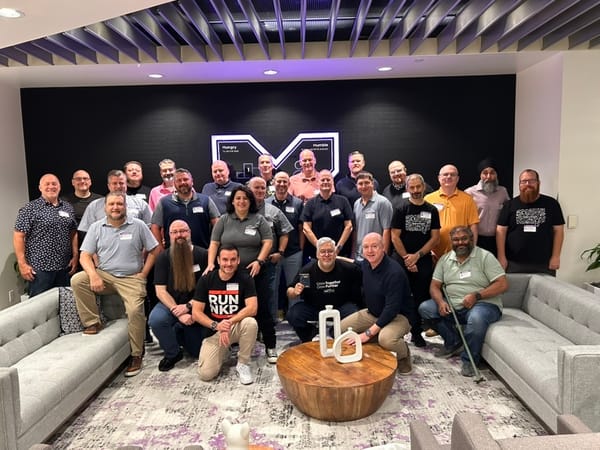
Nutanix Tech Connect 2026: Kubernetes, Private AI, and the Platform Behind It All After a slightly more eventful journey than planned, I finally made it to Nutanix headquarters in San Jose for Nutanix Tech Connect 2026. Tech Connect is an invite-only event for Nutanix Technology Champions. Around 28 NTCs from seven countries spent two days with the product managers, engineers, executives, and
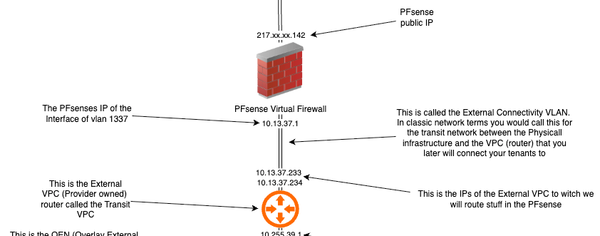
Tech Connect Day 3 - Time to go home - Deploying SP Central - Networking - Part 4 NTC Tech Connect 2026 is a wrap, and I'll create a summary post of the event later on. But first, let's wrap up SP Central by talking about the networking aspects of external access for the tenants. Make sure that you read my other posts in
NTC Tech Connect - Day 2 - Deploying SP Central - Part 3 So the first day was packed with sessions around cloud native and what Nutanix can do around Kubernetes with NKP (Nutanix Kubernetes Platform). I wrote a blog post series around NKP after the last NTC Tech Connect back in 2024. NKP Post 1: Preparing the setup environmentBefore we kick off
NTC Tech Connect - Travel Nightmare - Deploying SP Central - Part 2 So, as I was writing the last post, I was sitting at a restaurant at Stockholm Arlanda Airport and had completed the first leg of my journey, Sundsvall - Stockholm. Everything was going smoothly, and I promised you that I would update part two of the Deploying SP Central series somewhere
NTC Tech Connect 2026 here we go - Deploying SP Central Today I started my journey to San José and Nutanix headquarters. What better way to spend a flight of more than 13 hours to sunny California than writing a blog post? At Aderian GDM, we have recently been evaluating Nutanix Service Provider Central for use in our managed service provider
Find Recovery points So this week the storage usage in one of our clusters was growing rapidly. We have just made significant changes to our backup infrastructure. Upon investigation we made the discovery that there were a lot of Prism Central recovery points that were left behind on the cluster. We tried to
Automated Capacity report from PrismCentral I have been thinking about this for a long time. Can I automate capacity reports for my executives so they can trigger a capacity report on demand? At the end of last week, I thought it was time to automate this. Here are the details. The whole playbook is written
AWX Schedules for Autopatching playbooks So, if you have read my previous posts on autopatching for Windows and Linux templates in our environments: Windows Post: Autopatching Windows Templates with ansibleThe first thing I have been working on is the autopatching of our golden images that we use for our workflows where we create new virtual
Autopatching Linux Templates If you missed the first post in my series around Windows Template patching, you can find it here: Autopatching Windows Templates with ansibleThe first thing I have been working on is the autopatching of our golden images that we use for our workflows where we create new virtual machines. So
Autopatching Windows Templates with ansible The first thing I have been working on is the autopatching of our golden images that we use for our workflows where we create new virtual machines. So I thought that I should go through that process now in detail. In this post, we will cover the Nutanix Windows Workflow
Ansible Automation So, the beginning of the year has been quite busy for me. I have written some automations for our environment to make our day-to-day operations more efficient. So I thought that I should share what I have been working on. It's mainly two workflows * Automated Template
Nutanix API proxy The last week of November when I attended the .NEXT on tour in Copenhagen, Denmark, I had the pleasure of meeting up with Eric DeWitte in an EBX session for MSPs. One big problem for us using different Nutanix services in a multitenant way has been the need to open
Host multiple Prism Centrals on single Prism Element This week I attended the .NEXT OnTour event in Copenhagen, Denmark. We had the opportunity to have some EBX sessions with the worldwide CTO of Nutanix, Manosiz Bhattacharyya. The session focused on us as an MSP and what we would like to see going forward to be able to deliver
Update Nutanix CSI driver to 3.3.8 using Helm EDIT 2026-01-14: Nutanix have now released CSI Driver 3.6.0 witch fixes this precheck issue described below. nutanix-csi-storage 3.6.0 · nutanix/nutanix-helm-releasesNutanix Container Storage Interface (CSI) Driver ORIGINAL POST: Quick headsup if some of you are using the Nutanix CSI driver outside
Post 3: Deploy the first LLM We have now successfully deployed NAI on our non-NKP Kubernetes instance, as described in the last post, which you can find here: Post 2: Deploying NAINow that we have our Rancher cluster and the required storage classes in place from the last post (which you can find below), let’
Post 2: Deploying NAI Now that we have our Rancher cluster and the required storage classes in place from the last post (which you can find below), let's get our hands dirty and deploy Nutanix Enterprise AI: Deploying Nutanix Enterprise AI on non Nutanix k8s-serviceWe have been looking in to a
Post 1: Deploying Nutanix Enterprise AI on a Non-Nutanix Managed Kubernetes Cluster We have been looking into a couple of different AI initiatives at GDM, and we have been evaluating various products on the market to get LLMs into production. So, we decided to try out Nutanix Enterprise AI. I thought I would share our experiences deploying it with you. We deployed
.NEXT 2026 registrations are now open Take the opportunity to register for the next big Nutanix Event .NEXT 2026 in Chicago the 7-9th of April 2026. Click the registration banner below to secure your spot today!
DevOps 5: Summary and inspiration So, we have now successfully deployed a Rancher Orchestration cluster on k3s, we have deployed our Rancher RKE2 downstream cluster on nutanix using the nutanix node driver for rancher, and then we have deployed two fantastic tools, both AWX and Ansible Forms, to start automating and orchestrating our Nutanix environment
Devops Post 4: Deploying AWX and Ansible Forms with Fleet So now that we have the CSI driver in place on our RKE2 cluster, we can go ahead and deploy some workloads on it. In our case, we use AWX to orchestrate all our Ansible playbooks and code. What is AWX? Ansible AWX is an open-source, web-based automation
DevOps Post 3: Using Rancher Fleet to handle cluster configuration and deploying the Nutanix CSI driver Hi, now that we have the first RKE2 downstream cluster in place, you would start deploying some different workloads. To do that, we need to deploy manifests or Helm charts. The best way to do that is by using Rancher's built-in continuous delivery module called Rancher Fleet
DevOps Post 2: Deploying your first RKE2 downstream cluster using the Nutanix Node Driver Okay, now that you have your Rancher installation done, we're going to enable the Nutanix GUI extension and the Rancher node driver, connect to the Prism Central instance, and start deploying RKE2 Downstream Clusters. First, in the menu on the left-hand side, click Extensions: Then find the
DevOps Post 1: Setting up Rancher on k3s Welcome to the first post in the series. First of all, we need to set up the Rancher control plane node on something within our test environment. For us, we standardized this whole setup on Rocky Linux. For this test Rancher installation, we installed it on k3s on the Rocky
Building a DevOps Environment on Nutanix, Ansible, Kubernetes, and Rancher in Action A while ago, we started using Ansible to perform VM lifecycle operations on the Nutanix platform. Now that I finally have the time, I thought it would be a good idea to write a blog post series about how we set up the Ansible environment on our test cluster and
Nutanix move 5.5.2 is released Among the news there are some updates in supporter operatingsystems for migration and some new migration senarios among additional deployment types of the move appliance it self. Full details as usual on the Nutanix portal. Nutanix Support & Insights