Find Recovery points


So this week the storage usage in one of our clusters was growing rapidly. We have just made significant changes to our backup infrastructure. Upon investigation we made the discovery that there were a lot of Prism Central recovery points that were left behind on the cluster.
We tried to delete the recovery points from within Veeam but to no success. And since the GUI of the recovery points in Prism Central is "not so good" to express it mildly. When going through the GUI you have to click into every individual VM, to see the associated recovery points, and from there delete them. With over 1200 VMs in our environment that would be time consuming to say the least.
I decided to create an Ansible playbook that exported all the recovery points to a CSV file where I then could see what recovery points we had and how much space they consumed.
The columns in the CSV is this:
Snapshot ID,Snapshot name,VM name,VM exists,Snapshot size (GiB),Snapshot age (days)Then to stop this from occurring again, I also wrote a Python script that our NOC department could use to monitor the snapshot age in our environment with warning and critical levels.
I have made the code available in this example repository GitHub
 gdmjoho
The code is in general terms. First we have the Ansible playbook.
And if we start from the top and down.
Header and variables
We target localhost, skip fact-gathering (nothing to gather here), and pull credentials from a vault file. A YAML anchor &rp_uri_defaults keeps shared HTTP options in one place so we don't repeat them on every uri task.
- name: "Nutanix: List Recovery Points older than N days"
  hosts: localhost
  gather_facts: false
  vars_files:
    - vars/nutanix_info.yml
    - vars/secrets.yml
  vars:
    recovery_point_max_age_days: 7
    recovery_point_page_size: 500
    recovery_point_request_timeout: 90
    recovery_point_request_retries: 3
    recovery_point_request_retry_delay: 2
    recovery_point_csv_path: "reports/old_recovery_points.csv"
    recovery_point_parallel_workers: 24
    recovery_point_enrichment_retry_attempts: 2
    recovery_point_enrichment_retry_backoff_seconds: 0.2
    rp_list_url: "https://{{ pc_ip }}:9440/api/nutanix/v3/vm_recovery_points/list"
    rp_uri_defaults: &rp_uri_defaults
      method: POST
      user: "{{ vault_pc_username }}"
      password: "{{ vault_pc_password }}"
      force_basic_auth: true
      validate_certs: false
      return_content: true
      body_format: json
      headers:
        Content-Type: "application/json"
        Accept: "application/json"
Step 1: Probe the API for total count
A single request with length: 1 is enough to discover metadata.total_matches. We use that number to plan pagination.
- name: "Fetch first page (count probe)"
  ansible.builtin.uri:
    <<: *rp_uri_defaults
    url: "{{ rp_list_url }}"
    body: { kind: vm_recovery_point, length: 1, offset: 0 }
    status_code: 200
  register: vm_recovery_points_first
Step 2: Fetch all pages with retries
We loop over offsets generated from total_matches and fetch each page. until plus retries/delay makes the task tolerant to transient network or API hiccups. failed_when: false keeps the play running even if a page fails — failures are collected for diagnostics in the next step.
- name: "Fetch all recovery point pages"
  ansible.builtin.uri:
    <<: *rp_uri_defaults
    url: "{{ rp_list_url }}"
    body:
      kind: vm_recovery_point
      length: "{{ recovery_point_page_size | int }}"
      offset: "{{ item | int }}"
      sort_attribute: creation_time
      sort_order: ASCENDING
    timeout: "{{ recovery_point_request_timeout | int }}"
  failed_when: false
  changed_when: false
  until: vm_recovery_points_pages.status | default(-1) == 200
  retries: "{{ recovery_point_request_retries | int }}"
  delay: "{{ recovery_point_request_retry_delay | int }}"
  loop: "{{ range(0, vm_recovery_points_first.json.metadata.total_matches | default(0) | int, recovery_point_page_size | int) | list }}"
  loop_control: { label: "offset={{ item }}" }
  register: vm_recovery_points_pages
Step 3: Split successes from failures
In one set_fact we flatten all entities from successful pages into recovery_points_raw, and capture any failed offsets so we can report them.
- name: "Collect raw entities and failed offsets"
  ansible.builtin.set_fact:
    recovery_points_raw: "{{ vm_recovery_points_pages.results | selectattr('status', 'equalto', 200) | map(attribute='json.entities') | list | flatten }}"
    vm_recovery_points_failed_offsets: "{{ vm_recovery_points_pages.results | rejectattr('status', 'equalto', 200) | map(attribute='item') | list }}"
Step 4: Run the Python pipeline
Doing the per-item work in pure Ansible would be slow and noisy. Instead we hand the raw payload (and credentials) to a small Python script over stdin. The script normalizes timestamps, filters out points younger than the cutoff, looks up VM names and snapshot sizes in parallel, and writes the CSV file directly.
- name: "Run recovery point pipeline script"
  ansible.builtin.command:
    argv: [python3, scripts/nutanix_recovery_points_pipeline.py]
  args:
    stdin: >-
      {{ {
        'recovery_points_raw': recovery_points_raw,
        'cutoff_epoch': ((now(utc=true).strftime('%s') | int) - (recovery_point_max_age_days | int * 86400)),
        'now_epoch': (now(utc=true).strftime('%s') | int),
        'pc_ip': pc_ip,
        'username': vault_pc_username,
        'password': vault_pc_password,
        'timeout': (recovery_point_request_timeout | int),
        'max_workers': (recovery_point_parallel_workers | int),
        'retry_attempts': (recovery_point_enrichment_retry_attempts | int),
        'retry_backoff_seconds': (recovery_point_enrichment_retry_backoff_seconds | float),
        'validate_certs': false,
        'csv_path': recovery_point_csv_path
      } | to_json }}
  register: recovery_point_pipeline_result
  changed_when: false
  no_log: true
A few things worth noting:
cutoff_epochis computed inline as "now minus N days in seconds".no_log: trueprevents secrets in the stdin payload from leaking to the log.- The script handles its own concurrency, retries and backoff, configurable from the playbook.
Step 5: Expose pipeline results
The pipeline returns a JSON document on stdout. We parse it once into rp_data and pull out the human-readable rows for use in the summary.
- name: "Expose pipeline results"
  ansible.builtin.set_fact:
    rp_data: "{{ recovery_point_pipeline_result.stdout | from_json }}"
    old_recovery_points_human: "{{ (recovery_point_pipeline_result.stdout | from_json).old_recovery_points_human }}"
Step 6: Print a summary
A short, operator-friendly summary so you can verify the run at a glance: where the CSV landed, how many rows, how many had a missing VM, and how many had a known snapshot size.
- name: "Show CSV export summary"
  ansible.builtin.debug:
    msg:
      - "CSV written: {{ rp_data.csv_path }}"
      - "Rows written: {{ old_recovery_points_human | length }}"
      - "Rows with missing VM: {{ old_recovery_points_human | selectattr('vm_exists', 'equalto', 'no') | list | length }}"
      - "Rows with known snapshot size: {{ old_recovery_points_human | rejectattr('snapshot_size_gib', 'equalto', 'unknown') | list | length }}"
So that sums up the Ansible playbook.
Now let's take a look at the Python script correlating all the information into the CSV file.
The Python pipeline behind the playbook
The Ansible playbook does the orchestration, but the heavy lifting — normalizing data, filtering, parallel enrichment, and writing the CSV — happens in this Python script. It reads a JSON payload from stdin, talks to the Prism Central API, and writes both a JSON summary to stdout and the final CSV to disk.
Here's the script broken down piece by piece.
Step 1: Imports and constants
Standard library only — no external dependencies, which makes it easy to drop into any environment that has Python 3.9+.
SIZE_KEYS is the ordered fallback chain we try when a recovery point doesn't have an obvious size field. RETRYABLE is the set of HTTP status codes we automatically retry on.
#!/usr/bin/env python3
from __future__ import annotations

import base64
import csv
import json
import logging
import os
import ssl
import sys
import time
from concurrent.futures import ThreadPoolExecutor, as_completed
from datetime import datetime, timezone
from typing import Any, Callable
from urllib.error import HTTPError, URLError
from urllib.parse import quote
from urllib.request import Request, urlopen

API = "/api/nutanix/v3"
RETRYABLE = {408, 429, 500, 502, 503, 504}
SIZE_KEYS = ("size_bytes", "total_size_bytes", "consumed_size_bytes",
             "logical_size_bytes", "physical_size_bytes", "storage_usage_bytes")
CSV_HEADER = ["Snapshot ID", "Snapshot name", "VM name", "VM exists",
              "Snapshot size (GiB)", "Snapshot age (days)"]
Step 2: Logging to stderr
The script writes its JSON result to stdout — that channel is sacred, the playbook parses it. All diagnostic output goes to stderr instead, where Ansible can surface it on failure or with -v. Log level is configurable via the NTNX_RP_LOG_LEVEL environment variable.
logging.basicConfig(level=os.environ.get("NTNX_RP_LOG_LEVEL", "INFO").upper(),
                    format="%(asctime)s %(levelname)s %(message)s", stream=sys.stderr)
log = logging.getLogger("nutanix_rp_pipeline")
Step 3: Small helpers: dig and to_epoch
dig walks nested dicts safely — useful because the Prism v3 API has deep, optional structures (status.resources.parent_vm_reference.uuid).
to_epoch normalizes timestamps. Prism returns creation time in different formats depending on the field: ISO 8601 strings, seconds, milliseconds, or microseconds. We accept all of them and always return seconds.
def dig(obj: Any, *path: str, default: Any = None) -> Any:
    for k in path:
        if not isinstance(obj, dict) or k not in obj:
            return default
        obj = obj[k]
    return obj


def to_epoch(raw: Any) -> int:
    if raw is None or raw == "":
        return 0
    if isinstance(raw, (int, float)):
        ts = int(raw)
    elif str(raw).strip().isdigit():
        ts = int(str(raw).strip())
    else:
        try:
            t = str(raw).strip()
            dt = datetime.fromisoformat(t[:-1] + "+00:00" if t.endswith("Z") else t)
            return int((dt if dt.tzinfo else dt.replace(tzinfo=timezone.utc)).timestamp())
        except ValueError:
            return 0
    return ts // 1_000_000 if ts > 1_000_000_000_000_000 else ts // 1_000 if ts > 1_000_000_000_000 else ts
Step 4: SSL context
A small builder that returns a default SSL context, optionally with verification disabled. In many Nutanix environments Prism Central uses a self-signed cert, so this needs to be configurable from the playbook.
def mkctx(validate: bool) -> ssl.SSLContext:
    ctx = ssl.create_default_context()
    if not validate:
        ctx.check_hostname = False
        ctx.verify_mode = ssl.CERT_NONE
    return ctx
Step 5: A request function with retry and backoff
This is the workhorse for every API call. It handles three failure modes:
- Retryable HTTP statuses (408, 429, 5xx): retry with exponential backoff.
- Network errors (URLError, timeouts, SSL, broken connections): same retry behavior.
- Bad JSON in the response body: log and bail out cleanly.
It returns a tuple of (status_code, parsed_body) so callers don't have to handle exceptions themselves.
def request(req: Request, timeout: int, ctx: ssl.SSLContext, retries: int, backoff: float) -> tuple[int, dict[str, Any]]:
    attempts = max(1, retries)
    for i in range(attempts):
        try:
            with urlopen(req, timeout=timeout, context=ctx) as r:
                body = r.read().decode("utf-8", "replace")
                return int(getattr(r, "status", 200)), (json.loads(body) if body else {})
        except HTTPError as e:
            body = ""
            try:
                body = e.read().decode("utf-8", "replace")
            except OSError:
                pass
            if e.code in RETRYABLE and i < attempts - 1:
                log.warning("HTTP %s %s (try %d/%d)", e.code, req.full_url, i + 1, attempts)
                time.sleep(backoff * (2 ** i))
                continue
            log.error("HTTP %s %s: %s", e.code, req.full_url, body[:200])
            try:
                return int(e.code), json.loads(body) if body else {}
            except json.JSONDecodeError:
                return int(e.code), {}
        except (URLError, TimeoutError, ssl.SSLError, ConnectionError) as exc:
            if i < attempts - 1:
                log.warning("Net err %s (try %d/%d): %s", req.full_url, i + 1, attempts, exc)
                time.sleep(backoff * (2 ** i))
                continue
            log.error("Net err %s: %s", req.full_url, exc)
            return 0, {}
        except json.JSONDecodeError as exc:
            log.warning("Bad JSON from %s: %s", req.full_url, exc)
            return 0, {}
    return 0, {}
Step 6: Parsing snapshot size from the groups API
Prism's /groups endpoint returns deeply nested data. This helper digs through group_results → entity_results → data to find the snapshot_exclusive_user_bytes value, defaulting to 0 if anything is missing or malformed.
def parse_size(g: dict[str, Any]) -> int:
    gr = g.get("group_results") or [{}]
    data = gr[0].get("entity_results", [{}])[0].get("data", []) if isinstance(gr[0], dict) else []
    for entry in data if isinstance(data, list) else []:
        if isinstance(entry, dict) and entry.get("name") == "snapshot_exclusive_user_bytes":
            outer = entry.get("values") or [{}]
            inner = outer[0].get("values", []) if isinstance(outer[0], dict) else []
            v = inner[0] if inner else 0
            return int(v) if isinstance(v, (int, float)) else (int(v) if str(v).strip().isdigit() else 0)
    return 0
Step 7: A tiny parallel map
A reusable thread-pool wrapper. Hands each item to the worker function, collects results into a dict keyed by the worker's returned key. The optional skip_none flag is what lets us distinguish "VM exists but lookup failed" from "VM doesn't exist at all" later on.
def parallel(items: list[str], fn: Callable, workers: int, skip_none: bool = False) -> dict[str, Any]:
    if not items:
        return {}
    out: dict[str, Any] = {}
    with ThreadPoolExecutor(max_workers=max(1, min(workers, len(items)))) as pool:
        for fut in as_completed([pool.submit(fn, x) for x in items]):
            k, v = fut.result()
            if not (skip_none and v is None):
                out[str(k)] = v
    return out
Step 8: Normalize and filter
Walks every raw recovery point, computes a creation epoch, and keeps only the ones older than the cutoff. For each kept item we record the snapshot UUID, the parent VM UUID, and a fallback size from whichever first SIZE_KEYS field is present. Two sets of UUIDs (vm_ids, snap_ids) drive the next step.
def normalize(raw: list, cutoff: int, now: int) -> tuple[int, list[dict], set[str], set[str]]:
    old: list[dict] = []
    vm_ids: set[str] = set()
    snap_ids: set[str] = set()
    total = 0
    for item in raw:
        if not isinstance(item, dict):
            continue
        total += 1
        c_epoch = to_epoch(dig(item, "status", "resources", "creation_time_usecs")
                           or dig(item, "status", "resources", "creation_time")
                           or dig(item, "metadata", "creation_time", default=""))
        if not (0 < c_epoch < cutoff):
            continue
        sid = item.get("ext_id") or dig(item, "metadata", "uuid") or item.get("uuid") or "unknown"
        vm = (dig(item, "status", "resources", "parent_vm_reference", "uuid")
              or dig(item, "spec", "resources", "parent_vm_reference", "uuid") or "unknown")
        size_fb = next((dig(item, "status", "resources", k) for k in SIZE_KEYS
                        if dig(item, "status", "resources", k)), 0)
        old.append({
            "name": item.get("name") or dig(item, "status", "name") or dig(item, "spec", "name") or "unknown",
            "ext_id": sid, "vm_uuid": vm, "size_fb": int(size_fb or 0),
            "created_epoch": c_epoch, "age_days": int((now - c_epoch) / 86400),
        })
        if sid != "unknown":
            snap_ids.add(str(sid))
        if vm != "unknown":
            vm_ids.add(str(vm))
    old.sort(key=lambda x: x["created_epoch"])
    return total, old, vm_ids, snap_ids
Step 9: Concurrent enrichment
This is where the speedup happens. We need two extra pieces of information per old recovery point:
- The VM name (from
/vms/{uuid}— gives us human-readable rows and tells us if the VM still exists). - The snapshot size (from
/groups— gives us the actual disk usage).
Two inner closures (vm_w and sz_w) build the requests. The worker pool is split proportionally between VM name lookups and size lookups, then both run in parallel through a top-level executor.
def enrich(pc_ip: str, user: str, pwd: str, vm_ids: list[str], snap_ids: list[str],
           timeout: int, workers: int, ctx, retries: int, backoff: float) -> tuple[dict, dict]:
    total = len(vm_ids) + len(snap_ids)
    if not total:
        return {}, {}
    auth = base64.b64encode(f"{user}:{pwd}".encode()).decode("ascii")
    vm_h = {"Accept": "application/json", "Authorization": f"Basic {auth}"}
    gr_h = {**vm_h, "Content-Type": "application/json"}

    def vm_w(vm_id: str) -> tuple[str, str | None]:
        req = Request(f"https://{pc_ip}:9440{API}/vms/{quote(vm_id, safe='')}", headers=vm_h, method="GET")
        s, d = request(req, timeout, ctx, retries, backoff)
        name = dig(d, "status", "name") or dig(d, "spec", "name")
        return vm_id, str(name) if s == 200 and name else None

    def sz_w(sid: str) -> tuple[str, int]:
        body = json.dumps({
            "entity_type": "vm_recovery_point", "group_member_count": 1, "group_member_offset": 0,
            "availability_zone_scope": "LOCAL",
            "group_member_attributes": [{"attribute": "uuid"}, {"attribute": "snapshot_exclusive_user_bytes"}],
            "filter_criteria": f"uuid=={sid}",
        }).encode("utf-8")
        req = Request(f"https://{pc_ip}:9440{API}/groups", data=body, headers=gr_h, method="POST")
        s, d = request(req, timeout, ctx, retries, backoff)
        return sid, parse_size(d) if s == 200 else 0

    if not vm_ids:
        vw, sw = 1, max(1, workers)
    elif not snap_ids:
        vw, sw = max(1, workers), 1
    else:
        vw = max(1, min(workers - 1, round(workers * len(vm_ids) / total)))
        sw = max(1, workers - vw)
    with ThreadPoolExecutor(max_workers=2) as top:
        vf = top.submit(parallel, vm_ids, vm_w, vw, True)
        sf = top.submit(parallel, snap_ids, sz_w, sw, False)
        return vf.result(), {k: int(v) for k, v in sf.result().items()}
Step 10: Building human-readable rows
Combines the filtered list with the enrichment maps into clean, CSV-ready dicts. If the VM lookup didn't find a name, we set vm_exists: "no" and use the UUID as a placeholder. If the size is zero we mark it "unknown" rather than printing 0.0.
def build_human(old: list[dict], vm_map: dict, size_map: dict) -> list[dict]:
    rows = []
    for x in old:
        sid, vm = str(x["ext_id"]), str(x["vm_uuid"])
        size_b = int(size_map.get(sid, x["size_fb"]) or 0)
        rows.append({
            "snapshot_id": sid, "snapshot_name": str(x["name"]),
            "vm_name": str(vm_map.get(vm, vm)), "vm_exists": "yes" if vm in vm_map else "no",
            "snapshot_size_gib": round(size_b / 1024 ** 3, 2) if size_b > 0 else "unknown",
            "snapshot_age": int(x["age_days"] or 0),
        })
    return rows
Step 11: Writing the CSV
A small wrapper around csv.writer. Creates the parent directory if needed, uses QUOTE_MINIMAL so VM names with commas or quotes are escaped correctly.
def write_csv(path: str, rows: list[dict]) -> None:
    os.makedirs(os.path.dirname(os.path.abspath(path)) or ".", exist_ok=True)
    with open(path, "w", newline="", encoding="utf-8") as fh:
        w = csv.writer(fh, quoting=csv.QUOTE_MINIMAL)
        w.writerow(CSV_HEADER)
        for r in rows:
            w.writerow([r["snapshot_id"], r["snapshot_name"], r["vm_name"],
                        r["vm_exists"], r["snapshot_size_gib"], r["snapshot_age"]])
    log.info("Wrote CSV %s (%d rows)", path, len(rows))
Step 12: Tying it all together
The entry point reads its full configuration from a JSON document on stdin (passed in by the playbook), runs the pipeline, optionally writes the CSV, and dumps a summary JSON to stdout for Ansible to parse back.
The flow is clear and short:
- Read stdin payload.
- Normalize and filter.
- Run parallel enrichment.
- Build human-readable rows.
- Write CSV (if requested).
- Emit summary JSON to stdout.
def main() -> int:
    p = json.load(sys.stdin)
    raw = p.get("recovery_points_raw", [])
    csv_path = str(p.get("csv_path", "")).strip()
    log.info("Pipeline start: %d raw points", len(raw))

    total, old, vm_ids, snap_ids = normalize(raw, int(p.get("cutoff_epoch", 0)), int(p.get("now_epoch", 0)))
    log.info("Filtered %d old points. Enriching %d VMs / %d snapshots", len(old), len(vm_ids), len(snap_ids))

    vm_map, size_map = enrich(
        str(p.get("pc_ip", "")), str(p.get("username", "")), str(p.get("password", "")),
        list(vm_ids), list(snap_ids),
        int(p.get("timeout", 90)), int(p.get("max_workers", 16)),
        mkctx(bool(p.get("validate_certs", False))),
        int(p.get("retry_attempts", 3)), float(p.get("retry_backoff_seconds", 0.5)),
    )
    log.info("Enrichment done: %d names, %d sizes", len(vm_map), len(size_map))

    human = build_human(old, vm_map, size_map)
    if csv_path:
        write_csv(csv_path, human)

    json.dump({
        "normalized_count": total, "old_recovery_points_count": len(old),
        "old_recovery_points_human": human,
        "csv_path": csv_path or None, "csv_written": bool(csv_path),
    }, sys.stdout, ensure_ascii=True)
    return 0


if __name__ == "__main__":
    raise SystemExit(main())
Why split Ansible and Python?
Ansible is great at orchestration: vault, inventory, retries, structured tasks. It is less great at per-item enrichment of thousands of objects — Jinja loops over big datasets get slow and hard to read. Python is the opposite: not great at orchestration, excellent at concurrent HTTP calls and data shaping.
By keeping Ansible as the driver and Python as the worker, each tool does what it does best — and the playbook stays under 100 lines.
Conclusion playbook
So this was the playbook and the underlying Python script. It gives us the CSV file like this:
 gdmjoho
This report can then be imported in Excel or whatever tool you like to use, or to write a clean up script running commands like the below example to delete recovery points.
nuclei vm_recovery_point.delete 29806d92-3ac2-419d-b932-c6197aad614e confirm=falseAnd now? How can we prevent this from happening again?
Yeah we can do that by monitoring this with your favourite monitoring tool.
I wrote this script to run in our Icinga monitoring system
 gdmjoho
The script can be run with the below information:
python3 check_nutanix_recovery_points_age.py \
  --host prism.example.com \
  --username monitoring \
  --password 'secret' \
  --warn-days 11 \
  --crit-days 12 \
  --insecure
And then it gives an output like this:
python3 check_nutanix_recovery_points_age.py --host prism-central.example.com --username monitor --password 'secret' --warn-days 11 --critical 12 --insecure
CRITICAL - 45 recovery points older than 12d.
Critical SnapShots (>12d):
bdd640fb-0667-4ad1-9c80-317fa3b1799d (vm=happy-fox-12, age=15d);
bd9c66b3-ad3c-4d6d-9a3d-1fa7bc8960a9 (vm=srv-app-042, age=15d);
3b8faa18-37f8-488b-97fc-695a07a0ca6e (vm=otter28.corp.example, age=15d);
6b65a6a4-8b81-48f6-b38a-088ca65ed389 (vm=ancient-badger-07, age=15d);
01a9e71f-de8a-474b-8f36-d58b47378190 (vm=srv-db-118, age=15d);
f50bea63-371e-4d7b-a7cd-813047229389 (vm=heron93.lab.example.org, age=15d);
580d7b71-d8f5-4413-9be6-128e18c26797 (vm=clever-raven-31, age=15d);
ec1b8ca1-f91e-4d4c-9ff4-9b7889463e85 (vm=srv-web-009, age=15d);
5c941cf0-dc98-42c1-a2ac-f72f9e574f7a (vm=puffin54.prod.example.io, age=15d);
540e7335-cf60-49db-aaaa-3b210cdb9b7a (vm=mighty-lynx-72, age=15d);
2d3f1c54-7c01-491d-9f9c-aab2197a5c11 (vm=srv-sql-201, age=15d);
fb1c2d83-78cd-4b21-9be3-cb02a09d3401 (vm=tin-fw04, age=15d);
9821ad44-0c0d-43ed-9e7f-cbb0a4e8a99b (vm=cosmic-narwhal-19, age=14d);
70bafd4e-4d51-4d80-9c33-3b2b14ab6d20 (vm=srv-mgmt-013, age=13d);
1a2cab7e-9d6e-4d1b-93d5-77a44ff3e7a0 (vm=marmot44.internal.example.net, age=13d);
0afaa8e0-ec6f-4d12-aae5-9bdee15d2a83 (vm=quiet-gecko-58, age=13d);
b03e9bb7-2e21-4f50-9efb-3a59c47fe27b (vm=srv-bkp-067, age=13d);
4c54110f-5e6f-4d24-92b9-91a01d23a3c2 (vm=ferret02.example.local, age=13d);
72bb6d34-2d3e-4dc1-90c3-6d62a8b7c91e (vm=fuzzy-walrus-44, age=13d);
da27c5b1-2eaf-4f88-9e62-2cf01b13c4dd (vm=srv-fs-088, age=13d);
9163fd25-c0f1-4b69-a40b-37c1c6a1cc70 (vm=GOLDSTAR01, age=13d);
e0ad62b3-8d11-4afa-bf4a-1b14c2a9bb5e (vm=srv-rds-110, age=13d);
17f5d6cd-5e7c-4cb1-94da-44d1ad33f04c (vm=stormy-bison-22, age=13d);
3cb8de91-aa49-4cb6-9d83-f2d8db3f1e90 (vm=kestrel11.corp.example, age=13d);
a4e34027-cf04-4cf0-9b7b-fef0fa3fe14c (vm=srv-mon-046, age=13d);
86fb6db4-1102-4d35-a37e-67a25c0aef21 (vm=panda73.lab.example.org, age=13d);
2bc70b41-8a85-4ce0-9711-19a3a1bb15ad (vm=witty-koala-09, age=13d);
591f88b4-2cdd-4d1e-95c8-93c0ca47ed2f (vm=SRV-EVENT-01, age=13d);
46d129ca-0091-4cc3-9aa5-37e5ddf5a2ad (vm=db18.prod.example.io, age=13d);
b1cf3a2b-4eaa-4c25-a51c-0a3e2a36d72e (vm=srv-cache-052, age=13d);
0c70d5be-23b7-43c1-9bb7-b3df9d5e89e9 (vm=cougar07.internal.example.net, age=13d);
b8f4be05-2a4d-4faa-8013-6b8c9b9e51b7 (vm=lucky-tapir-15, age=13d);
fcdcf1c0-fcb1-4302-90df-d28110f0a35d (vm=srv-auth-006, age=13d);
0bcf4e70-2d96-44b1-a5e2-7d39e872a3d4 (vm=PATCHMGR-NODE-01, age=13d);
3aa9b1c5-1cdb-43ad-90ce-9b07b820e8ad (vm=srv-queue-029, age=13d);
9b620e9c-78a0-4e63-9e02-32a6cb9d7a1e (vm=DEMO-ARCHIVE-21, age=13d);
2feaf3a9-c9d5-431b-bf4a-2d0e7c0b1e74 (vm=ibis66.example.local, age=13d);
ed5c7610-7c54-46b6-bdee-c1f7d4b0ca6f (vm=srv-db-019, age=13d);
e8f4ed3c-71c0-4ef9-87d9-8a8a8b0a5cab (vm=ANALYTICS-01, age=13d);
ac0f7d10-d4d2-4d1f-a6c7-9bd4d3a52f81 (vm=AUDIT-NODE-04, age=13d);
74e4af2e-3a85-4a2f-8f2e-2dca0ba43e0a (vm=tapir34.corp.example, age=13d);
46d9f3aa-cb2b-4cdb-bf3e-4c8aa15bb6f7 (vm=srv-rds-061, age=13d);
3a4e0f49-2dba-4cf1-bf3d-5a5db05be5b3 (vm=rds04.prod.example.io, age=13d);
67b9a35a-25e8-4cdb-9b4d-1f1eaeb5b7c2 (vm=stoat19.lab.example.org, age=13d);
8f5b8e9c-69ad-4a5f-a4f1-7f5b21ad4c3a (vm=srv-mon-091, age=13d);
| total=1929 warning_count=0 critical_count=45 offenders=45 oldest_days=15 warn=11 critical=12
And as a result of this we found a lot of old unused orphaned recovery points that we were able to delete. And we found almost 47 TiB of storage that we could "get back".
This is how it looks in our monitoring system:
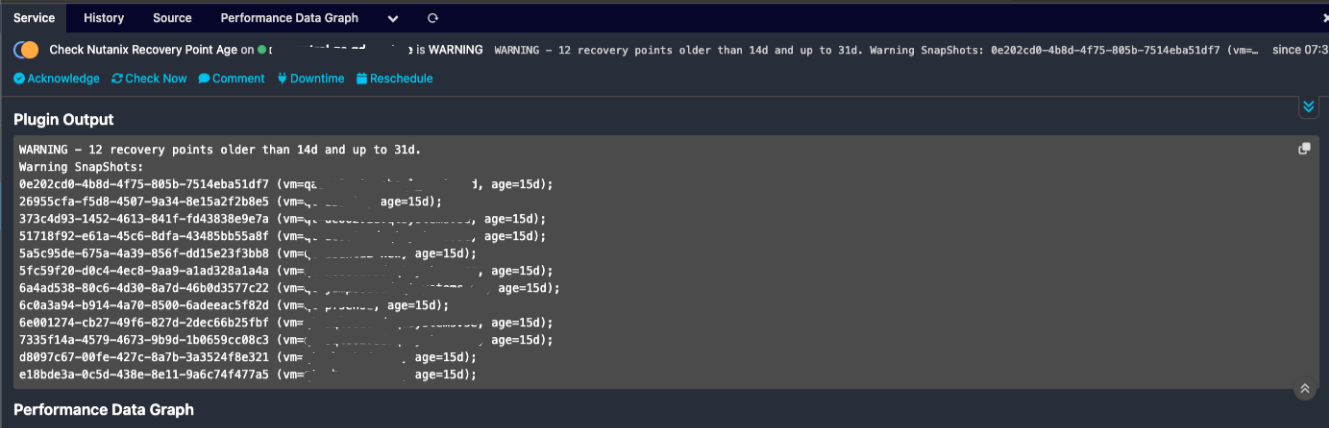
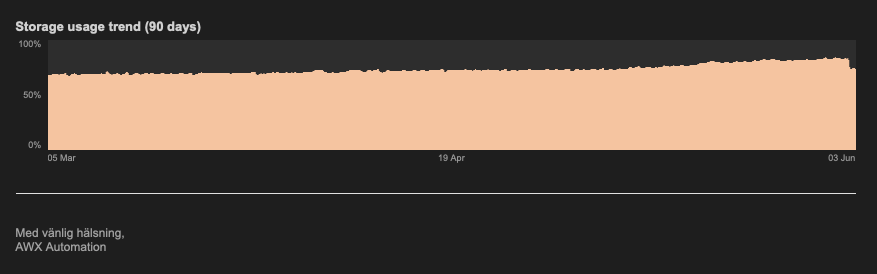
This is how the storage usage graph looks after we deleted some stale recovery points that was growing, the largest recovery point was almost 15 TiB in size. Notice the big drop at the end of the graph. And there's still about 10 TiB to be handled by curator before being freed up.
So that's all folks. Hope this can help someone out there :)